Codelocks Launches Mobile App to Streamline Remote Lock Management
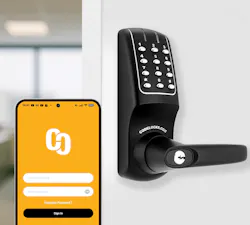 The Codelocks Connect App allows users to generate and manage time-sensitive access codes directly from a mobile device.
The Codelocks Connect App allows users to generate and manage time-sensitive access codes directly from a mobile device.
Codelocks has introduced its new Codelocks Connect App, a mobile solution designed to simplify how users remotely manage connected locks and access permissions.
The app enables business owners, building managers and other authorized personnel to create and distribute access codes via email or SMS directly from a mobile device. This functionality is intended to make managing building and locker access more convenient while maintaining existing performance and features.
At the core of the app is Codelocks NetCode® Technology, which allows users to generate time-sensitive access codes with defined start dates, times and durations. These codes automatically expire once the set timeframe ends. With more than 10,000 users of NetCode® locks, the technology supports temporary access use cases across environments such as sports facilities, event hire spaces and parcel delivery lockers.
Matt Welty, Vice President at Codelocks Americas, said the technology is being adopted in a growing range of applications across the United States and Canada, including wellness retreats, music studios, short-term rentals and tennis courts. He noted that beyond simplifying access control, time-sensitive codes are helping organizations create new revenue opportunities by enabling on-demand, self-service access to spaces and storage.
Welty added that the mobile app represents a step forward for customers, allowing access codes to be generated, shared and managed within seconds from a smartphone. He emphasized that for businesses operating multiple locations or managing frequent user turnover, the app can significantly reduce administrative workload.
The Codelocks Connect App builds on the existing desktop-based Codelocks Connect Portal, delivering the same functionality in a mobile-optimized format. Users can generate, activate and manage NetCodes from anywhere, removing the need to operate solely from a fixed office environment.
The app also supports adding and registering new locks directly from a mobile device, which is particularly useful for installers and facilities managers during setup. Locks already registered in the Connect Portal can be imported without duplication, and all updates are automatically synchronized between the app and the portal. Additionally, multiple managers can be assigned to individual locks or groups of locks, allowing teams to share access responsibilities.
The Codelocks Connect App is compatible with a range of NetCode®-enabled lock solutions, including select KitLock models such as KitLockClassic and KitLockMax, as well as certain models in the CL5000 electronic lock range. It is available for both iOS and Android devices and can be downloaded from the Apple App Store and Google Play.